



Mailchimp is the email marketing tool most small businesses start with, and it is still a good one. It is easy to use, integrates with almost everything, and has a free plan. It is also one of the more expensive options once your list grows, its free plan has shrunk to the point of being a trial, and the automation most businesses want sits on its mid-tier plan. This review covers what Mailchimp does well, where it falls short, what it really costs in 2026, and when to choose something else.
Prices are Mailchimp’s US list prices for its Marketing plans on monthly billing, as of autumn 2026.
Mailchimp Review: The Short Verdict
| Mailchimp | |
|---|---|
| Best for | Small businesses that want an easy tool with a huge range of integrations |
| Price | Free for 250 contacts; Essentials from $13, Standard from $20, Premium from $350 a month |
| Pricing model | By number of contacts in your audience |
| Owner | Intuit, since 2021 |
| Biggest strength | Ease of use plus 300+ integrations |
| Biggest weakness | Expensive as lists grow; real automation starts on Standard |
Mailchimp Pricing
Mailchimp charges by the number of contacts in your audience, not by how many emails you send. A month with no campaigns costs the same as a busy one.
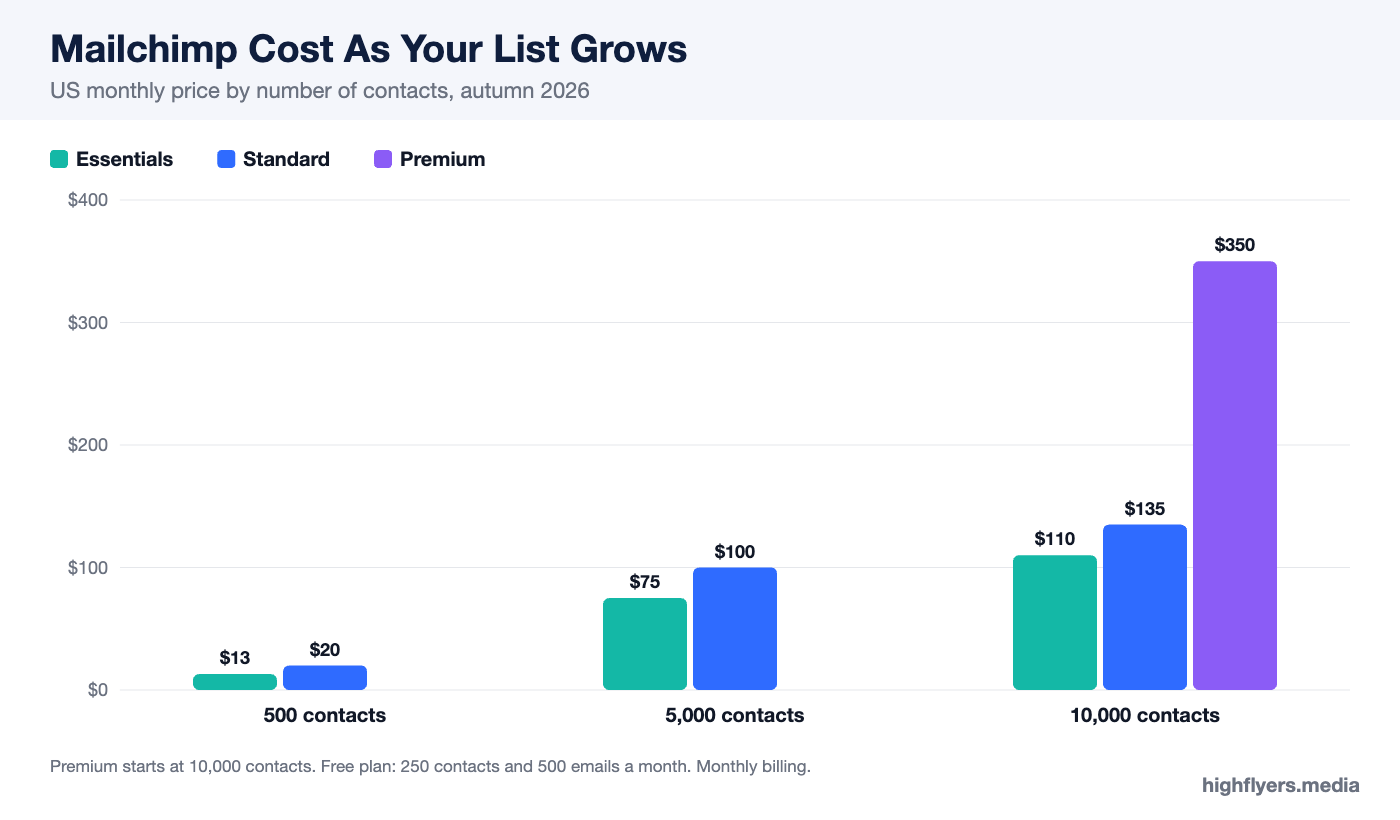
| Plan | Starting price | At 5,000 contacts | At 10,000 contacts | Users | Automation |
|---|---|---|---|---|---|
| Free | $0 (250 contacts) | Not available | Not available | 1 | Single-step |
| Essentials | $13 (500 contacts) | $75 | $110 | 3 | Flows up to 4 steps |
| Standard | $20 (500 contacts) | $100 | $135 | 5 | Branching flows up to 200 steps |
| Premium | $350 (10,000 contacts) | From $350 | $350 | Unlimited | Branching flows, advanced segmentation |
The free plan covers 250 contacts and 500 emails a month, with a daily cap of 250 sends. That is enough to learn the tool and not much more. Essentials tops out at 50,000 contacts, Standard at 100,000, and Premium runs to 200,000 before custom pricing.
What Mailchimp Does Well
Ease Of Use
Mailchimp’s campaign builder is one of the easiest in the category. Templates are clean, the drag-and-drop editor is predictable, and a first newsletter can go out within an hour of signing up. Reports on opens, clicks and revenue are clear without needing interpretation.
Integrations
With more than 300 native integrations, Mailchimp connects to almost every website builder, ecommerce platform, CRM, form tool and payment system a small business is likely to use. If a tool exists, it probably has a Mailchimp connector. That breadth is the main reason businesses stay even when cheaper tools exist.
Marketing Beyond Email
Mailchimp includes landing pages, signup forms, basic social posting, SMS in supported regions, and a content studio for storing images and brand assets. Its AI tools help draft subject lines and copy and suggest send times. For a small team that wants one place for basic marketing, it covers a lot.
Deliverability And Reliability
Mailchimp’s scale and long track record mean well-maintained infrastructure and strong compliance tooling. Emails from a clean, opted-in list tend to land in the inbox.
Where Mailchimp Falls Short
Cost As Your List Grows
Mailchimp is competitively priced at 500 contacts and expensive at 5,000 or more. Standard at 5,000 contacts costs $100 a month, roughly double what several competitors charge for similar automation. Because pricing is by contact rather than by send, a large list that you email rarely is especially costly. Archiving inactive contacts is the standard way to keep the bill down.
Automation Is Split Across Plans
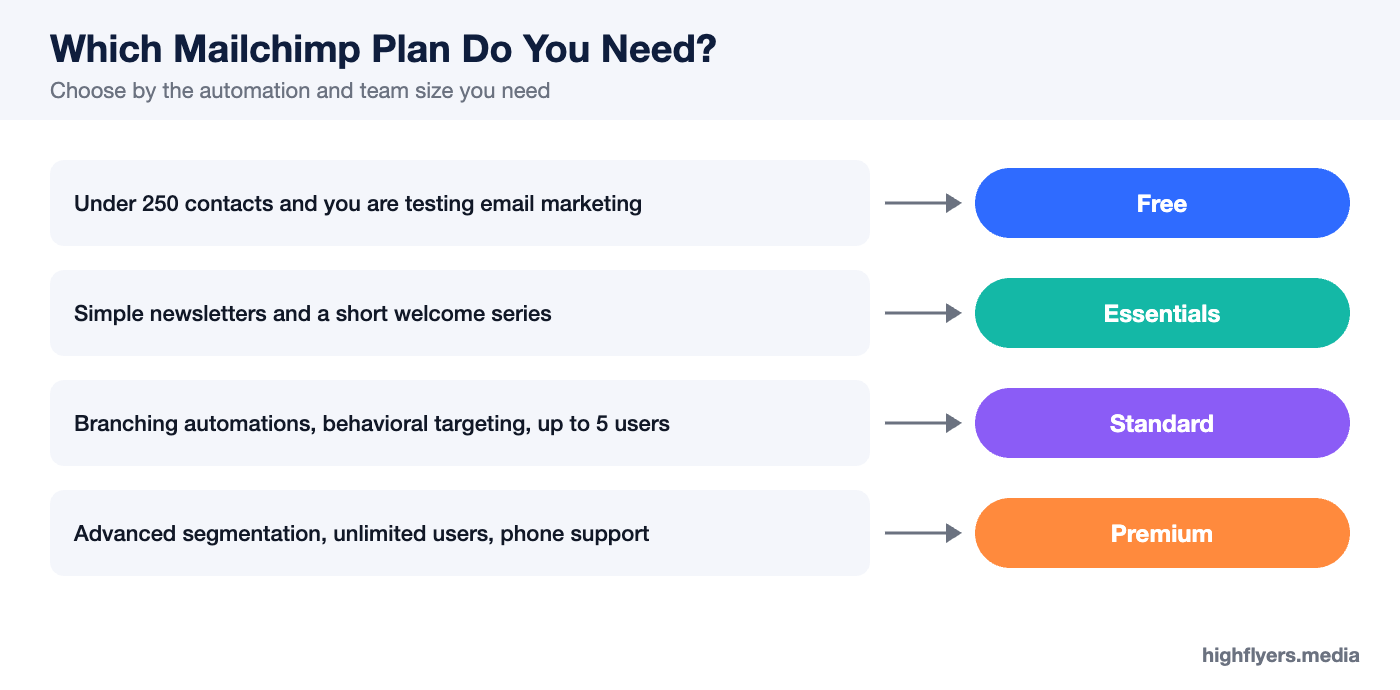
Essentials limits automated flows to four steps, which covers a basic welcome series but not much else. Branching journeys, behavioral targeting, send-time optimization and dynamic content start on Standard. Businesses that want email automation as a growth channel should budget for Standard from the start.
The Free Plan Is Small
At 250 contacts and 500 sends a month, Mailchimp’s free plan is now one of the smallest in the market. MailerLite and Brevo offer more on their free tiers.
Support On Lower Plans
Essentials and Standard include email and chat support. Phone support is reserved for Premium at $350 a month and up.
Mailchimp For Ecommerce
Mailchimp connects to Shopify, WooCommerce, Squarespace and other platforms, supports abandoned cart emails, product recommendations and purchase-based segments, and reports revenue by campaign. It is a reasonable choice for small stores. Stores that live on email revenue often find Klaviyo’s deeper use of order data worth its higher price; our Mailchimp alternatives guide compares the options.
Who Should Use Mailchimp
Choose Mailchimp if you want the easiest possible start, if you depend on integrations with a range of tools, or if your list is small and likely to stay that way. Standard is the plan most growing businesses will end up on, because that is where useful automation lives.
Who Should Look Elsewhere
Look elsewhere if your list is past a few thousand contacts and growing, if you want advanced automation without paying Standard prices, or if you email a large list only occasionally. MailerLite, Brevo and Klaviyo are the usual alternatives depending on your needs.
Frequently Asked Questions
Is Mailchimp free?
Yes, for up to 250 contacts and 500 emails a month. Paid plans start at $13 a month for 500 contacts.
How much does Mailchimp cost for 5,000 contacts?
About $75 a month on Essentials and $100 on Standard. Premium starts at $350 a month.
Do unsubscribed contacts count toward my Mailchimp bill?
Mailchimp bills on the contacts in your audience, and contacts you no longer email can still count. Archive or remove inactive contacts to keep costs down.
Is Mailchimp good for beginners?
Yes. It is one of the easiest email tools to learn.
Conclusion
Mailchimp remains an easy, reliable and well-connected email marketing tool, and for small lists it is fairly priced. The value fades as your audience grows: Standard is where automation becomes useful, and at a few thousand contacts it costs noticeably more than strong alternatives. Start on Mailchimp if ease and integrations matter most, keep your list clean, and revisit the decision when your contact count passes 5,000.
