


Shopify is the default answer to “where should I sell online”, and for a lot of businesses it is the right one. It is also more expensive than its entry price suggests, more dependent on paid apps than its marketing admits, and a poor fit for some businesses that end up on it anyway. This review covers what Shopify does well, where it falls short, what it really costs in 2026, and who should pick something else.
Prices and limits below are Shopify’s published US figures as of October 2026.
Shopify Review: The Short Verdict
| Shopify | |
|---|---|
| Best for | Businesses where selling products is the core of the business |
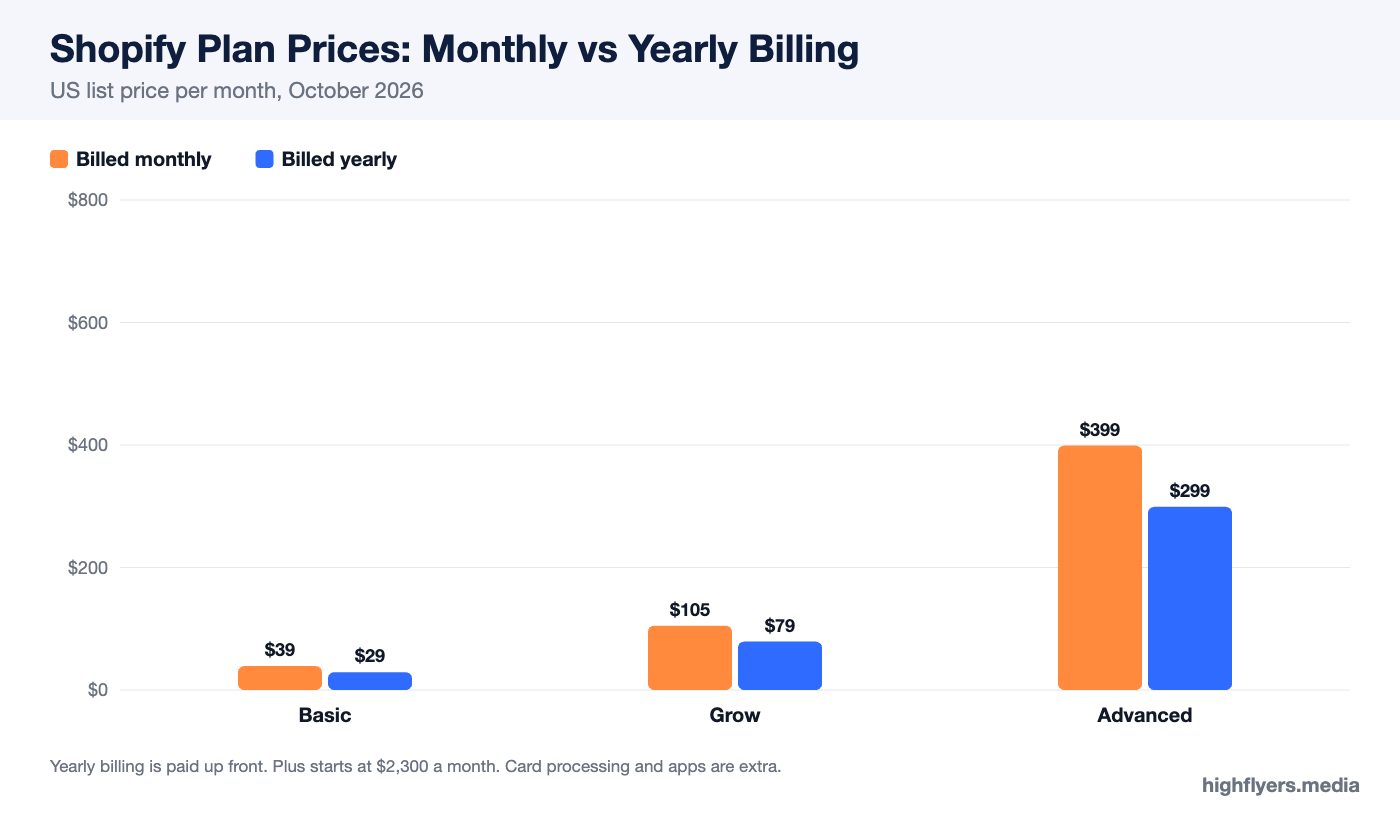
| Price | Basic $39, Grow $105, Advanced $399 a month; $29, $79 and $299 billed yearly; Plus from $2,300 |
| Card rate (US, online) | 2.9% + 30¢ on Basic down to 2.5% + 30¢ on Advanced |
| Free plan | No; short trial plus a recurring $1-a-month offer for three months |
| Biggest strength | Checkout, inventory and multichannel selling that scale without a replatform |
| Biggest weakness | Real costs pile up in apps and per-order fees |
| Not ideal for | Content-led sites, service businesses, very small catalogs on a tight budget |
What Shopify Is, And What It Is Not
Shopify is a hosted commerce platform. You pay a monthly fee and Shopify runs the servers, the checkout, security, payment processing and updates. You do not install or maintain software, and you cannot take the platform’s code elsewhere. That trade, less control in exchange for far less maintenance, is the whole proposition.
It is worth being clear about what Shopify is built around. The features that change between plans are staff accounts, inventory locations, reporting, API limits and B2B catalogs. Design tools barely change at all. Shopify is an operations system that happens to include a website, which is why it suits stores with real inventory and frustrates people who mainly wanted a good-looking site.
What Shopify Does Well
Checkout
Shopify’s checkout is the platform’s strongest asset. It is fast, well tested on mobile, and supports Shop Pay, Apple Pay, Google Pay and PayPal out of the box. Shop Pay in particular lets returning shoppers who have bought from any Shopify store check out with saved details, which tends to lift conversion compared with a guest form. Most stores will never touch checkout code, and on the standard plans they cannot, but for most that is a feature.
Inventory And Catalog Scale
Every standard plan supports up to 10 inventory locations, so a store can run a warehouse, a retail floor and a third-party fulfillment site as separate stock pools. Plus raises that to 200. Products can carry up to 2,048 variants, though only three option types such as size, color and material, which occasionally forces a workaround for products with four or more axes.
Selling Everywhere
Shopify treats your website as one sales channel among several. Marketplaces, social shops, Google and in-person retail all sync to the same product and inventory records. Shopify POS turns a phone or tablet into a till with in-person card rates from 2.6% plus 10 cents. For a brand that sells at markets, in a shop and online, this single source of truth is hard to replicate elsewhere at the same price.
The App And Partner Ecosystem
Whatever you need, someone has built a Shopify app for it: subscriptions, reviews, loyalty, returns, bundles, ERP and accounting sync, wholesale portals. Behind the apps sits a deep bench of agencies and developers who work only on Shopify. That depth is the main reason businesses stay as they grow, because almost any requirement has an existing solution and a person who has implemented it before.
Reliability
Because Shopify runs the infrastructure, traffic spikes from a launch or a sale are its problem rather than yours. You do not manage hosting, caching, security patches or PCI compliance for the checkout.
Where Shopify Falls Short
The Real Cost Is Not The Plan Price
Basic is $29 a month on yearly billing, but very few stores run on Basic alone. Card processing at 2.9% plus 30 cents is the largest line on most bills. Paid apps for reviews, upsells, subscriptions or search commonly cost $10 to $50 a month each. A premium theme is a one-off cost of a few hundred dollars. Our Shopify pricing guide works through what a store actually pays at different sales levels.
The Penalty For Using Another Payment Provider
If you process payments through anything other than Shopify Payments, Shopify adds 2% to every order on Basic, 1% on Grow and 0.6% on Advanced, on top of the provider’s own fees. Shopify Payments is available in most major markets, but businesses in restricted categories or unsupported countries can find themselves paying twice for every sale.
Content And Blogging
Shopify includes a blog, and it is adequate for product news and basic SEO content. It is not a publishing platform. There are no categories in the usual sense, limited layout control in posts and no native gated content. Brands whose growth comes from content often run a separate CMS or accept the limits.
Staff On Basic
Basic gives the owner a login and no additional staff accounts. The first hire who needs admin access pushes you to Grow at $79 a month on yearly billing, nearly triple the Basic price. Plan for that step if you expect help within the year.
Lock-In
You can export products, customers and orders as CSV files. You cannot export your theme to another platform, and apps that store data in their own systems take it with them when you leave. Moving off Shopify is a rebuild plus a data migration, and URL changes put rankings at risk if redirects are not planned carefully.
Shopify Pricing In Brief
| Plan | Monthly | Yearly (per month) | Staff | Card rate online |
|---|---|---|---|---|
| Basic | $39 | $29 | Owner only | 2.9% + 30¢ |
| Grow | $105 | $79 | 5 | 2.7% + 30¢ |
| Advanced | $399 | $299 | 15 | 2.5% + 30¢ |
| Plus | From $2,300 | From $2,300 | Unlimited | Negotiated |
Ease Of Use
Setting up a basic store is straightforward: pick a theme, add products, connect payments and a domain, and you can be live in an afternoon. The theme editor is section-based, so you rearrange blocks rather than placing elements freely. That makes it hard to break a layout and also hard to build something unusual without code.
The admin is clean and consistent. The learning curve arrives with the extras: understanding which features are native and which need apps, configuring shipping profiles and tax correctly, and keeping an app stack under control as it grows.
SEO On Shopify
Shopify handles SEO basics well: editable titles, meta descriptions and URL handles, automatic sitemaps, SSL, and redirects when you change a URL. Its URL structure is fixed, with products under /products/ and collections under /collections/, and duplicate paths created by collections and variants need care. Most technical issues on Shopify stores come from themes and apps rather than the platform itself, which is why platform-specific experience matters. We cover that in Shopify SEO vs general SEO.
Support
Shopify offers 24/7 support by chat and email, with a large help center and community forum. Plus merchants get a dedicated support path. For anything involving theme code or third-party apps, support will usually direct you to the app developer or a Shopify Partner.
Who Should Use Shopify
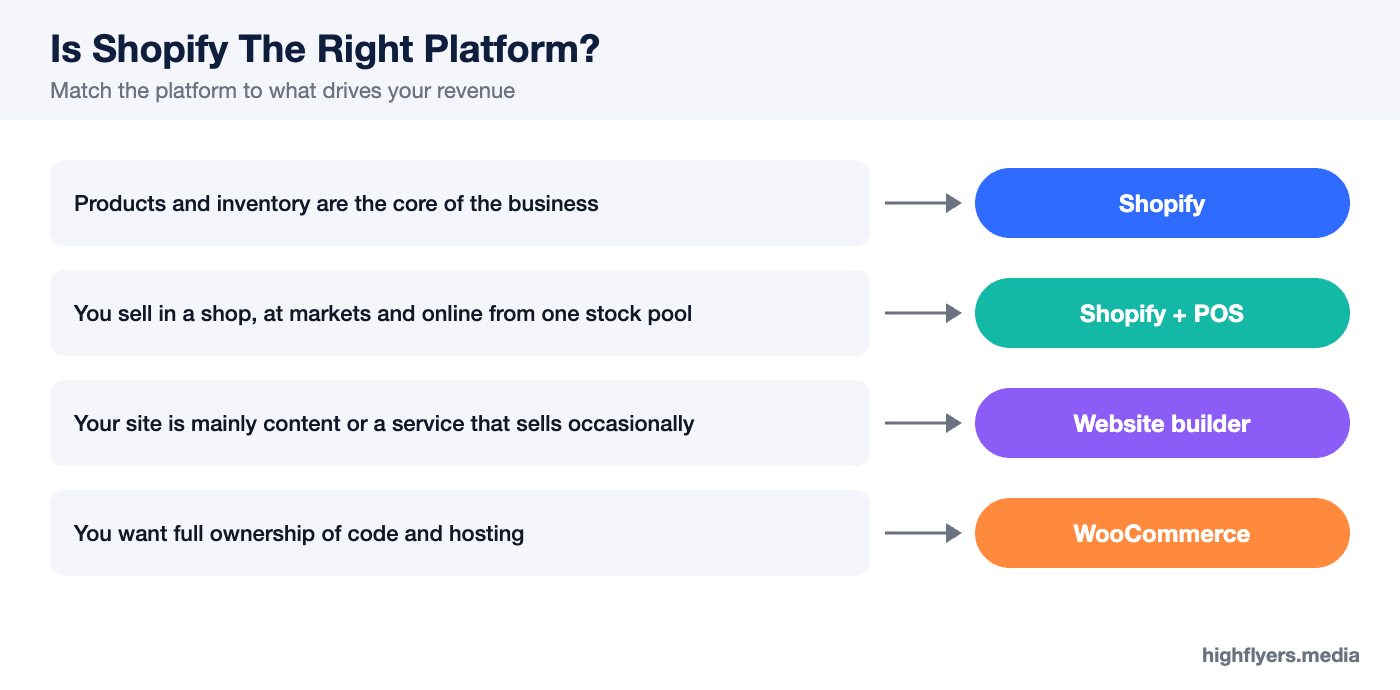
Choose Shopify if products are the business: physical inventory, a real catalog, plans to sell in more than one place, or a team that needs separate logins. It is also the safest choice if you expect to grow quickly, because the path from Basic to Plus does not require changing platform.
Who Should Look Elsewhere
Look elsewhere if your site is mainly content or a service business that sells occasionally. A website builder with commerce included will cost less and give better writing tools; see Squarespace vs Shopify and Wix vs Shopify. If you want full ownership of the code and hosting, compare Shopify with WooCommerce. And if you sell digital products, courses or memberships, dedicated tools often charge less per sale.
Frequently Asked Questions
Is Shopify good for beginners?
Yes. A basic store is easy to launch, and Shopify’s documentation is extensive. The learning curve comes later, with apps, shipping rules and tax settings.
Is Shopify worth the money?
For product businesses selling a few thousand dollars a month or more, usually yes. Below that, the plan fee plus apps can take a large share of margin, and cheaper builders deserve a look.
Can I leave Shopify later?
You can export products, customers and orders. Your theme and much app data do not move, so leaving means rebuilding the storefront.
Conclusion
Shopify is the strongest all-round platform for businesses that live or die on selling products. Its checkout, inventory handling, multichannel tools and partner ecosystem are ahead of general website builders, and it scales from a one-person store to an enterprise without a migration. The cost is real: card fees, a staff-account jump to Grow, and an app budget that grows quietly. Go in with those numbers modeled, keep the app stack lean, and Shopify is very hard to beat.