



Asana is the project management tool that teams pick when they want structure: clear owners, due dates, dependencies, and a line from daily tasks up to company goals. It is polished, reliable and easy to learn. It is also one of the pricier tools in its category once you need its best features, and the jump from its Starter plan to Advanced more than doubles the cost per person. This review covers what Asana does well, where it falls short, what it costs in 2026, and who should use it.
Prices are Asana’s US list prices as of October 2026.
Asana Review: The Short Verdict
| Asana | |
|---|---|
| Best for | Teams that run structured, cross-functional projects |
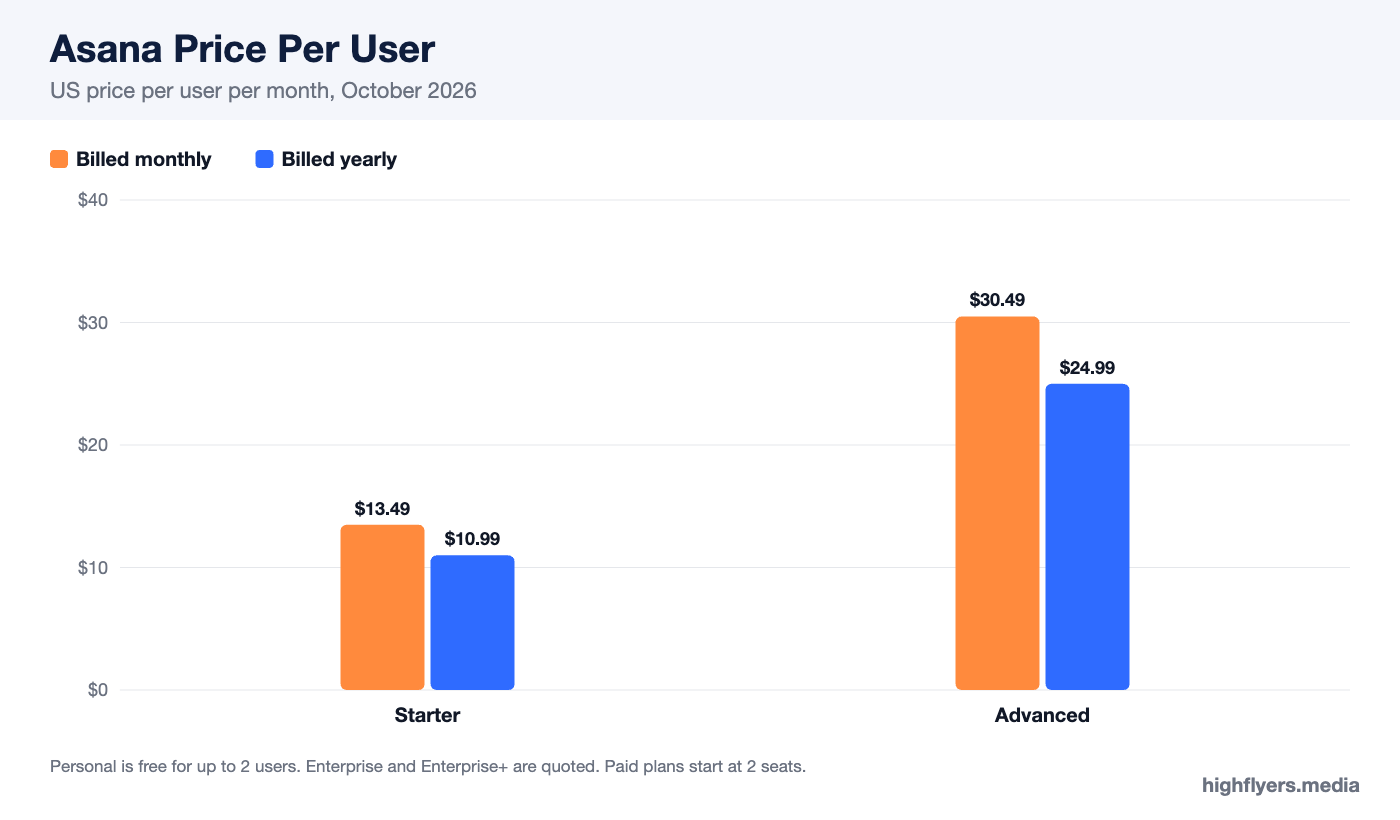
| Price | Free for 2 users; Starter $10.99, Advanced $24.99 per user a month billed yearly |
| Minimum | 2 seats on paid plans, sold in seat blocks |
| Biggest strength | Clean, intuitive interface with strong planning views |
| Biggest weakness | Goals, portfolios and workload only on the expensive Advanced plan |
| Not ideal for | Budget-conscious teams; software teams that need issue tracking |
Asana Pricing
| Plan | Per user, billed yearly | Per user, billed monthly | Key additions |
|---|---|---|---|
| Personal | $0 (up to 2 users) | $0 | Tasks, projects, list, board and calendar views |
| Starter | $10.99 | $13.49 | Timeline and Gantt, workflow builder, forms, custom fields, reporting dashboards |
| Advanced | $24.99 | $30.49 | Goals, portfolios, workload, approvals and proofing, time tracking |
| Enterprise and Enterprise+ | Quote | Quote | Advanced security, admin controls, compliance features |
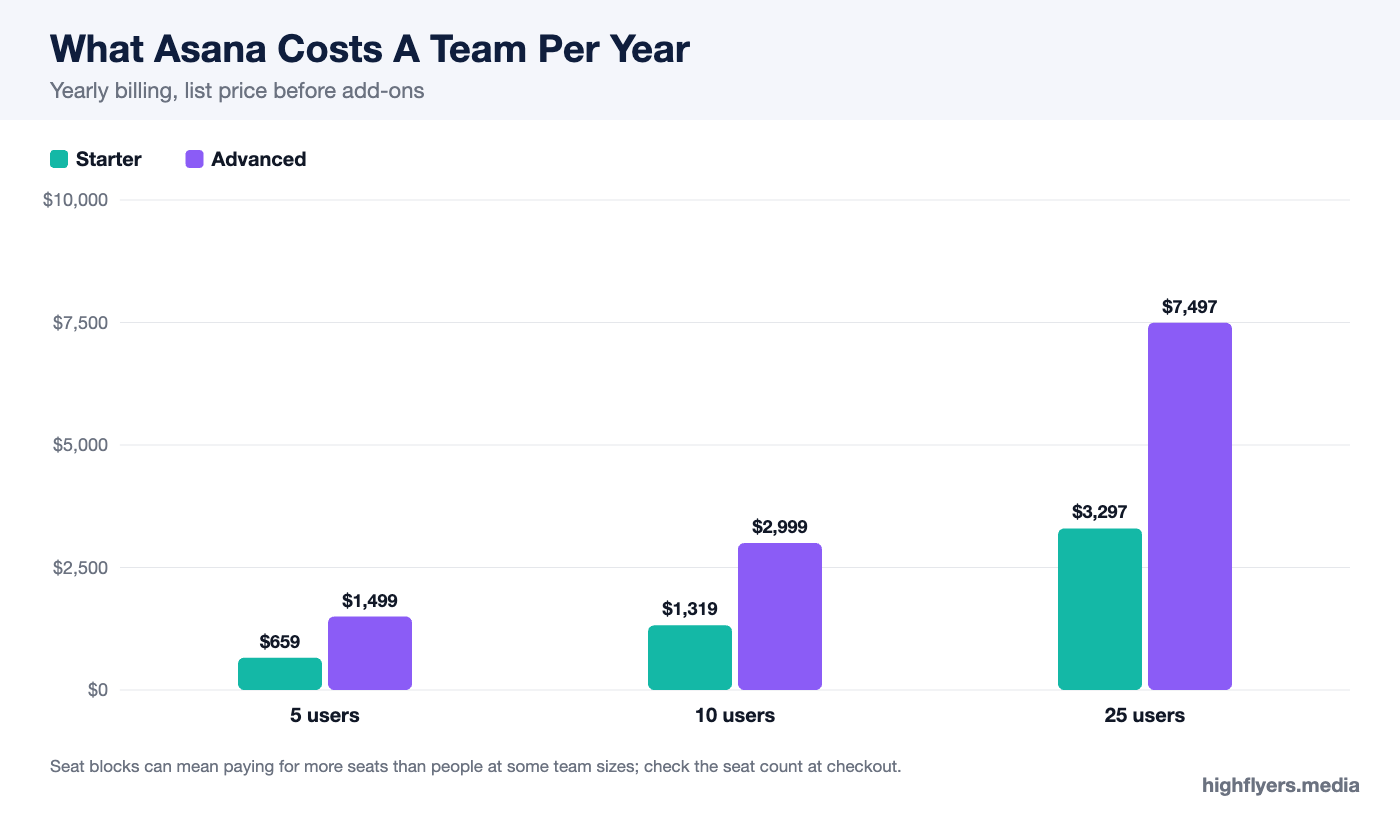
Yearly billing saves up to about 18%. Paid plans start at two seats and are sold in blocks above a certain team size, so a team can pay for more seats than it has people; check the seat count at checkout. Eligible nonprofits can get a discount on Starter and Advanced.
What Asana Does Well
Interface And Ease Of Use
Asana is one of the most polished tools in work management. Tasks, subtasks, comments and attachments are where you expect them, keyboard shortcuts are thorough, and switching between list, board, calendar and timeline views is instant. New team members tend to be productive on day one.
Structured Planning
Asana is built around projects with clear owners, dates and dependencies. Timeline view shows how work connects, and changing one date shows the knock-on effect on the rest. Rules automate routine steps such as assigning tasks or moving them between sections. For teams running launches, campaigns or client projects with many moving parts, this structure keeps work on track.
Goals, Portfolios And Workload
On Advanced, Asana connects projects to company goals, groups projects into portfolios with status at a glance, and shows each person’s workload across every project they are on. This is Asana’s real differentiator at the management level: leaders can see whether the work underway actually supports what the company is trying to achieve, and who is overloaded.
Forms And Intake
Asana forms turn requests from other teams into tasks with the right fields filled in. Marketing, design, legal and operations teams use them to stop work arriving by email and chat.
Integrations And AI
Asana integrates with Slack, Microsoft Teams, Google Workspace, Zoom, Salesforce and many other tools. Its AI features can summarize tasks and projects, draft updates and help build workflows, with usage limits that vary by plan.
Where Asana Falls Short
The Price Jump To Advanced
Moving from Starter to Advanced takes the cost per user from $10.99 to $24.99 on yearly billing, an increase of about 127%. Goals, portfolios, workload and time tracking are all on Advanced. For a ten-person team that is roughly $1,320 a year on Starter against $3,000 on Advanced. Teams should be sure they will use those features before upgrading.
One Assignee Per Task
Asana assigns each task to a single person. That is deliberate, to make accountability clear, but teams used to shared tasks need to split work into subtasks or use collaborators.
Less Flexible Than monday.com Or ClickUp
Asana is opinionated about how projects should work. Teams that want to model unusual processes, or use the tool as a lightweight database, will find monday.com or ClickUp more adaptable.
Not A Developer Tool
Asana can track engineering work, but teams that need issue tracking, sprint reports and deep code integration usually prefer Jira or Linear.
Asana vs The Alternatives
Against monday.com, Asana is more structured and better for planning with dependencies, while monday.com is more flexible and visual; see our monday.com review. Against ClickUp, Asana is simpler and more polished, while ClickUp packs more features into cheaper plans. For lighter kanban-style work, our Trello vs Asana comparison covers when the simpler tool is enough.
Who Should Use Asana
Choose Asana if your team runs projects with deadlines, dependencies and several contributors, and you value a tool people enjoy using. Starter covers most teams. Choose Advanced if leaders need goals, portfolios and workload views across many projects.
Who Should Look Elsewhere
Look elsewhere if price per seat is the main constraint, if you need a flexible tool for many unusual workflows, or if you are a software team. ClickUp, monday.com and developer-focused tools respectively are better fits.
Frequently Asked Questions
Is Asana free?
Yes. The Personal plan is free for up to two users. Paid plans start at $10.99 per user a month billed yearly.
What is the difference between Asana Starter and Advanced?
Starter adds timeline, the workflow builder, forms and reporting. Advanced adds goals, portfolios, workload, approvals and time tracking, at $24.99 per user a month billed yearly.
Is Asana good for small teams?
Yes. Starter gives small teams strong planning views at a moderate price, though it costs more per seat than ClickUp or monday.com Standard.
Conclusion
Asana is the most polished structured project management tool in 2026. Its planning views, forms and interface make it easy to adopt, and Advanced adds management features that competitors struggle to match. The cost is the price: Advanced is expensive, and much of what makes Asana distinctive lives there. Start on Starter, prove the habits stick, and upgrade only when goals and workload views would change how you run the team.