



monday.com is the colorful, board-based work management tool that teams outside software development tend to adopt fastest. It is easy to start, flexible enough for almost any workflow, and good at giving managers a clear view of who is doing what. It is also priced in a way that makes small teams pay for seats they do not use, and the automation that makes it powerful is limited until the Pro plan. This review covers what monday.com does well, where it falls short, what it really costs in 2026 and who should use it.
Prices are monday.com’s US list prices for monday work management as of October 2026. CRM, dev and service are separate monday products with their own prices.
monday.com Review: The Short Verdict
| monday.com | |
|---|---|
| Best for | Non-technical teams that want a visual, flexible way to track work |
| Price | Free for 2 seats; Basic $9, Standard $12, Pro $19 per seat a month billed yearly |
| Minimum | 3 seats on paid plans, sold in seat bundles |
| Biggest strength | Fast adoption and flexible boards that fit almost any process |
| Biggest weakness | Seat bundles and automation limits raise the real cost |
| Not ideal for | Software teams running sprints; very small teams on a tight budget |
monday.com Pricing
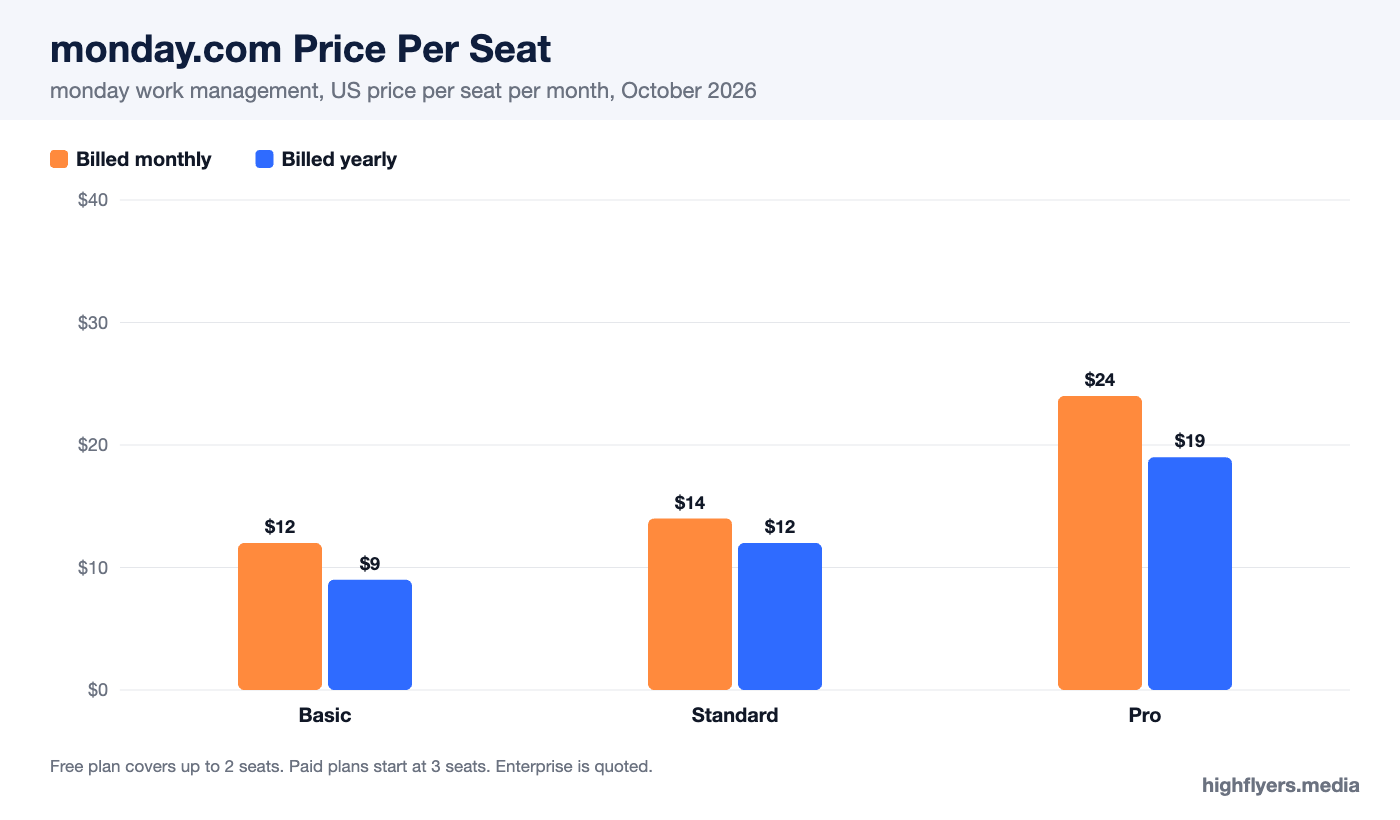
| Plan | Per seat, billed yearly | Per seat, billed monthly | Key additions |
|---|---|---|---|
| Free | $0 (up to 2 seats) | $0 | 3 boards, 3 docs, templates |
| Basic | $9 | $12 | Unlimited items and free viewers, more storage |
| Standard | $12 | $14 | Timeline and Gantt, calendar, guest access, 250 automation and 250 integration actions a month |
| Pro | $19 | $24 | Private boards, time tracking, formula columns, 25,000 automation and integration actions a month |
| Enterprise | Quote | Quote | Portfolio and resource management, advanced security and permissions |
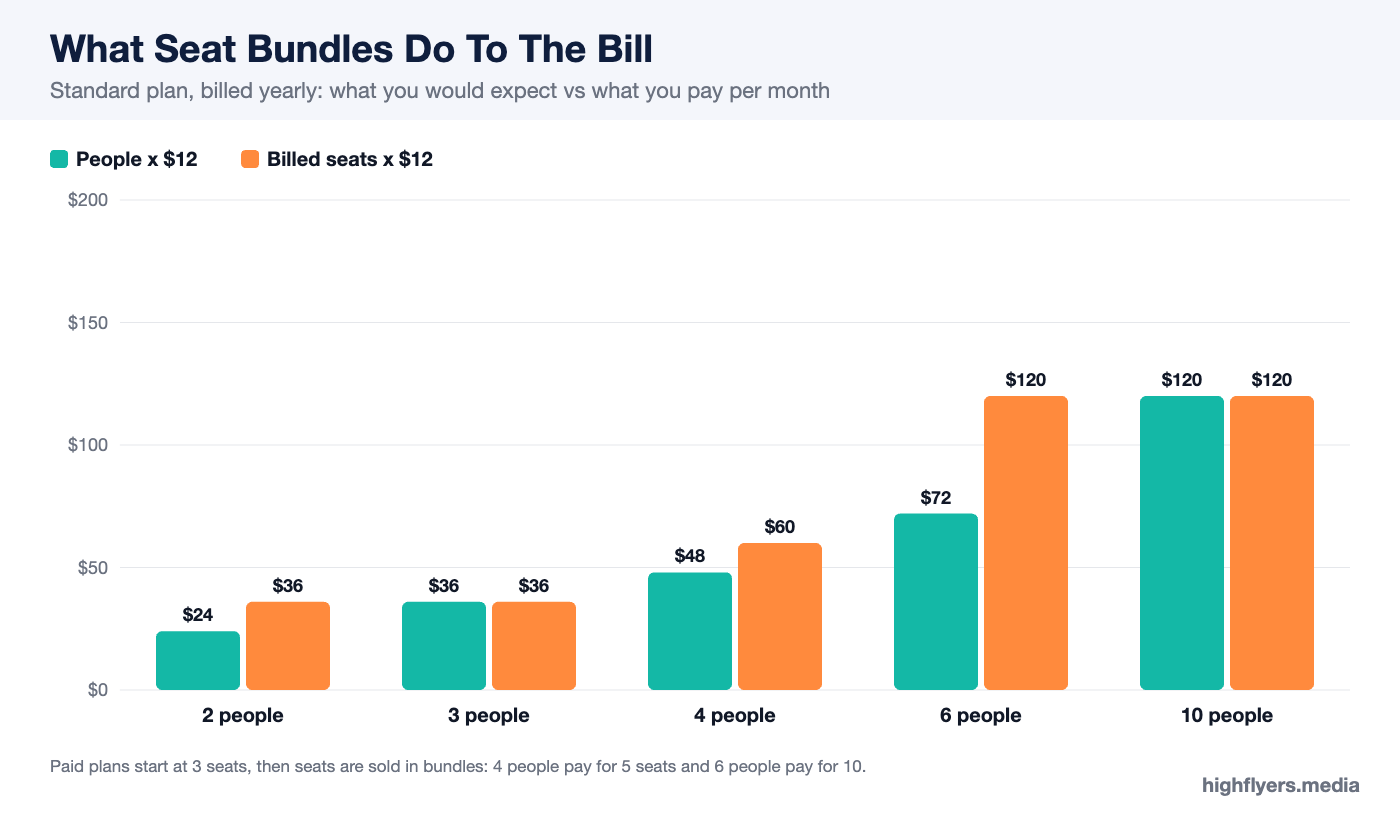
Two pricing details catch buyers out. Paid plans start at three seats, so a two-person team pays for three. Seats are then sold in bundles rather than one at a time, so four people pay for five seats and six people pay for ten. A six-person team on Standard pays for ten seats, which is $120 a month on yearly billing rather than the $72 the per-seat rate suggests. Paid plans also include a monthly allowance of AI credits that rises with the tier.
What monday.com Does Well
Fast Adoption
monday.com’s boards look like a spreadsheet that has been made pleasant to use. Each row is an item, each column a status, owner, date or number, and colors make progress obvious at a glance. New team members understand a board within minutes, which is the single biggest reason teams stick with it. A project tool nobody updates is worthless; monday.com gets updated.
Flexibility
Boards can model almost any process: marketing calendars, content pipelines, hiring, client onboarding, event planning, procurement, simple CRM. Hundreds of templates give each use case a starting point, and column types let you track exactly the fields you need. Teams across a company can run very different workflows on the same platform.
Views And Dashboards
The same data can be shown as a table, kanban board, timeline, Gantt chart, calendar or chart, and dashboards combine several boards into one view for managers. On Standard and above, timeline and Gantt views make monday.com usable for project planning with dependencies, not just task tracking.
Automation And Integrations
Recipe-style automations (“when status changes to Done, notify the client and move the item to the archive group”) are easy to build without technical skills. Integrations with Slack, Gmail, Outlook, Google Drive, HubSpot, Salesforce and other common tools sync data in and out.
Where monday.com Falls Short
Seat Bundles Inflate The Price
The three-seat minimum and bundled seats mean the real cost depends heavily on your exact headcount. Teams of two, four or six pay noticeably more per person than the headline rate. Free viewers help for people who only need to look, but anyone who edits needs a paid seat.
Automation Limits On Standard
Basic has no automations. Standard includes 250 automation actions and 250 integration actions a month, which a busy team can use up within days. Pro raises the limit to 25,000. Teams that plan to automate meaningfully should budget for Pro, at $19 a seat.
Not Built For Software Teams
monday.com can track sprints, but developers used to Jira or Linear will miss native issue tracking, git integration depth and agile reporting in monday work management. monday sells a separate monday dev product for that, at a separate price.
Can Get Messy At Scale
Because boards are so flexible, large organizations without conventions end up with many inconsistent boards. Enterprise adds portfolio and permission controls, but governance still needs someone to own it.
Who Should Use monday.com
Choose monday.com if your team is mostly non-technical, needs a visual tool people will actually use, and works across varied processes. Standard is the right starting plan for most teams, because Basic lacks timelines and automations.
Who Should Look Elsewhere
Look elsewhere if you are a team of two on a tight budget, a software team that needs proper issue tracking, or a team that wants heavy automation without paying Pro prices. ClickUp offers more features per dollar with a steeper learning curve, and Asana suits teams that want structured projects and goals; see our Asana review and ClickUp review.
Frequently Asked Questions
Is monday.com free?
Yes, for up to two seats with three boards. Paid plans start at $9 per seat a month billed yearly, with a three-seat minimum.
How much does monday.com cost for 10 people?
On yearly billing, about $90 a month on Basic, $120 on Standard and $190 on Pro, before any add-ons.
Which monday.com plan is best?
Standard suits most teams. Choose Pro if you need time tracking, private boards or more than 250 automation actions a month.
Is monday.com good for project management?
Yes, for business teams. Standard and above include timeline and Gantt views for planning. Software teams usually prefer dedicated developer tools.
Conclusion
monday.com is one of the easiest work management tools to roll out and one of the most flexible once it is in place. Its weaknesses are mostly about price: seat bundles, a three-seat minimum and automation limits that push active teams toward Pro. Check the real cost for your exact headcount, start on Standard, and monday.com is likely to be a tool your team keeps using.