



ClickUp sells itself as one app to replace all the others: tasks, docs, goals, whiteboards, chat, time tracking and dashboards in a single workspace. It comes closer to that promise than any rival, and its paid plans are among the cheapest in project management. The price of all those features is complexity. ClickUp takes longer to set up and learn than Asana or monday.com, and its AI is now sold separately on top of the plan. This review covers what ClickUp does well, where it falls short, what it really costs in 2026, and who should use it.
Prices are ClickUp’s US list prices as of October 2026.
ClickUp Review: The Short Verdict
| ClickUp | |
|---|---|
| Best for | Teams that want one flexible workspace and will invest in setting it up |
| Price | Free Forever; Unlimited $7 and Business $12 per user a month billed yearly |
| AI | Add-on: Brain AI $9 or Everything AI $28 per user a month |
| Biggest strength | More features per dollar than any major rival |
| Biggest weakness | Steep learning curve and a busy interface |
| Not ideal for | Teams that want a simple tool working in a day |
ClickUp Pricing
| Plan | Per user, billed yearly | Per user, billed monthly | Who it suits |
|---|---|---|---|
| Free Forever | $0 | $0 | Individuals and small teams testing ClickUp |
| Unlimited | $7 | $10 | Small teams that have outgrown the free plan |
| Business | $12 | $19 | Growing teams that need automation, workload and permissions |
| Enterprise | Quote | Quote | Large organizations with security and admin needs |
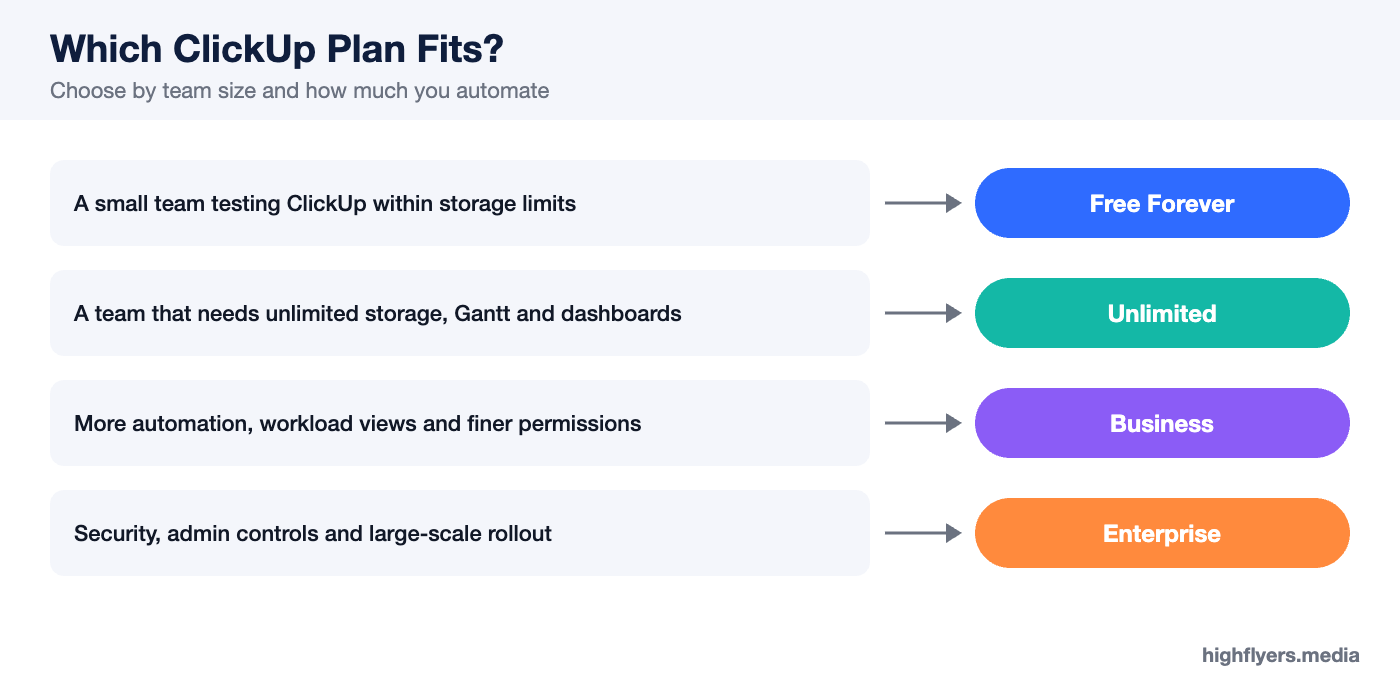
The Free Forever plan allows unlimited members and tasks but limits storage, some views and automations. Unlimited removes most of those limits, adding unlimited storage, integrations, dashboards and Gantt charts. Business adds more automation runs, workload management, advanced dashboards, mind maps, Google sign-in and finer permissions.
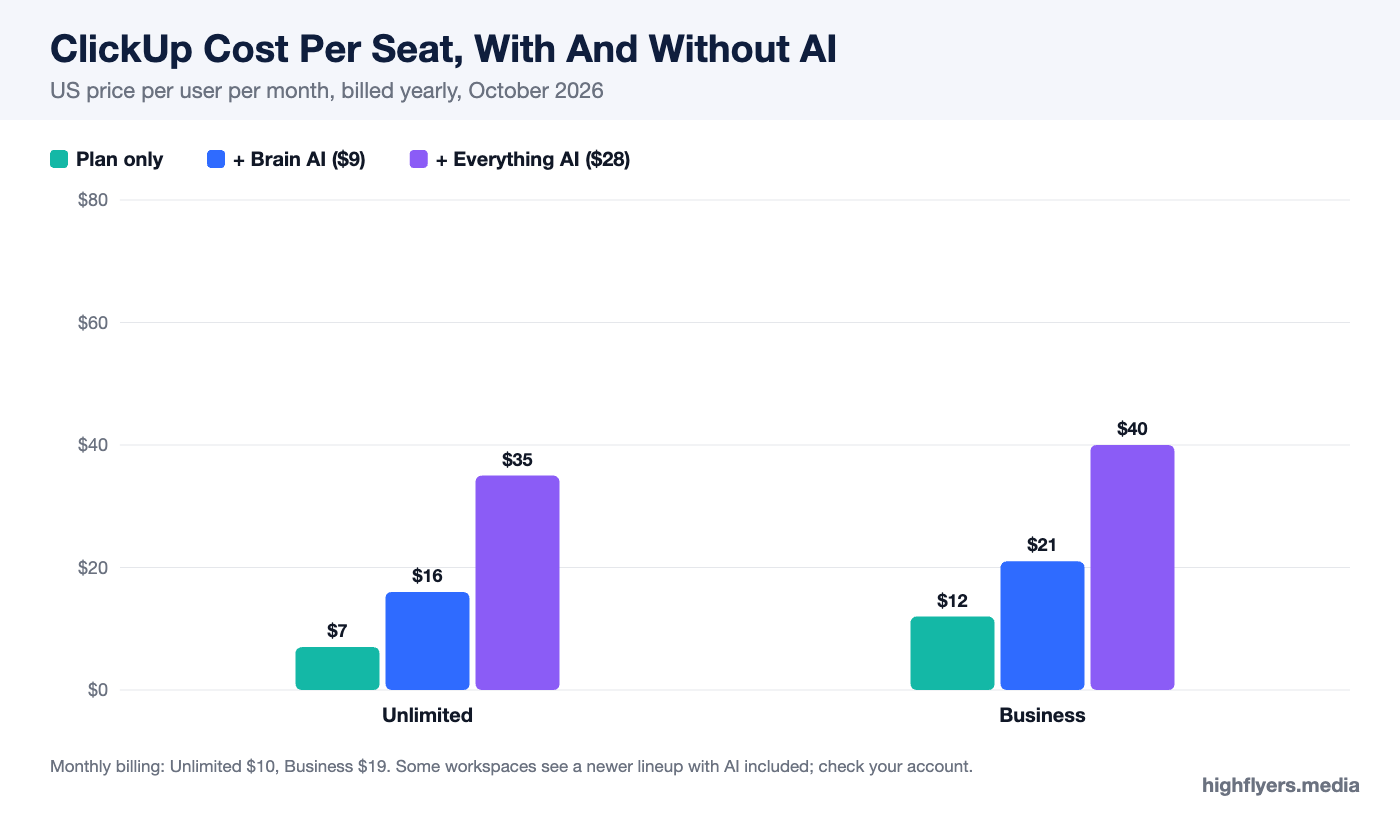
AI is not included in these plans. ClickUp sells Brain AI at $9 per user a month and Everything AI at $28 per user a month on top of any plan, with heavier AI features drawing on usage-based credits. A Business seat with Everything AI costs $40 per user a month, more than three times the headline price. Some workspaces are also being shown a newer lineup with AI included in every plan, so check which pricing your account sees.
What ClickUp Does Well
Features Per Dollar
ClickUp Unlimited at $7 per user a month billed yearly is the cheapest paid tier among the major project management tools, and it includes features that competitors reserve for higher plans: unlimited Gantt charts, dashboards, custom fields and integrations. For budget-conscious teams that need depth, nothing else offers as much at the price.
One Workspace For Most Work
Tasks, documents, whiteboards, goals, chat, forms and time tracking live in the same app and link to each other. A doc can contain live task lists, a whiteboard idea can become a task, and dashboards pull from everything. Teams that consolidate onto ClickUp can cancel several separate subscriptions.
Views And Customization
The same work can be shown as a list, board, calendar, Gantt chart, timeline, table, workload view or mind map. Custom fields, statuses and task types let each team model its own process, and the hierarchy of Workspaces, Spaces, Folders and Lists can organize anything from a small agency to a large company.
Automation
ClickUp’s automations handle routine steps such as assigning tasks, changing statuses, posting comments and moving work between lists. Business raises the monthly automation allowance substantially over Unlimited, which matters for teams that rely on them.
Free Plan
Free Forever allows unlimited members and unlimited tasks, which is rare. Small teams can run simple projects on it indefinitely if they live within its storage and feature limits.
Where ClickUp Falls Short
Learning Curve
ClickUp’s flexibility makes it harder to learn than Asana or monday.com. The hierarchy, settings and number of features can overwhelm new users, and a workspace set up carelessly becomes cluttered quickly. Plan time for setup, conventions and training, or the tool will feel heavier than it is.
Interface
Even well configured, ClickUp’s interface is busier than its competitors’. Users who want a calm, focused task list sometimes find it distracting.
AI Costs Extra
Competitors increasingly include some AI in their plans. On ClickUp’s standard lineup it is an add-on that can multiply the per-seat cost. Teams that want AI across the workspace should price it in from the start.
Performance
Large workspaces with many views, automations and long task lists can feel slower than lighter tools. ClickUp has improved speed significantly, but heavy users still notice it.
ClickUp vs The Alternatives
Against Asana, ClickUp offers more features for less money, while Asana is simpler and more polished; see our Asana review. Against monday.com, ClickUp is cheaper and deeper, while monday.com is easier to roll out to non-technical teams; see our monday.com review.
Who Should Use ClickUp
Choose ClickUp if you want one workspace for tasks, docs and planning, are cost-conscious, and have someone willing to design the setup. It is particularly popular with agencies, operations teams and startups that want to consolidate tools. Our roundup of SaaS companies for business growth covers more of the software those teams rely on.
Who Should Look Elsewhere
Look elsewhere if your team wants something simple and pleasant from the first day, or if most users are not comfortable with complex software. Asana and monday.com are easier choices in that case.
Frequently Asked Questions
Is ClickUp free?
Yes. Free Forever includes unlimited members and tasks, with limits on storage and some features. Paid plans start at $7 per user a month billed yearly.
Which ClickUp plan should I choose?
Unlimited suits most small teams. Choose Business if you need workload management, more automations or finer permissions.
Does ClickUp include AI?
On the standard plans, AI is an add-on: Brain AI at $9 or Everything AI at $28 per user a month. Some accounts see newer plans with AI included.
Is ClickUp hard to learn?
It takes longer than simpler tools. Teams that agree on structure and conventions early find it much easier.
Conclusion
ClickUp delivers more functionality per dollar than any major project management tool in 2026, and it genuinely can replace several other apps. Its weaknesses are the effort it takes to set up and learn, and an AI add-on that can triple the cost of a seat. If your team will invest in a clean setup, ClickUp Unlimited or Business is outstanding value; if you need something simple, choose a simpler tool.
